Python skype notifier for Ubuntu
What’s the best way to learn a new programming language ? Well, according to this question the best (only ?) way to learn a new language is just to code in that language.
Why Python ?
Because it’s named after the Monty Python
No, seriously, that’s why : No, not this “that’s why”! That one
If you are just starting out as a programmer, I cannot recommend Learn Python The Hard Way highly enough. It is an excellent introduction to the ideas and skills you will need as a programmer, starting from the very basics, like you’ve never seen a for loop in your life. Actually the first 10 or so lessons do not include ANY control structures!
If on the other hand you already have some coding experience, I recomend Dive Into Python. Although it’s no quite as hands on as Learn Python the Hard Way, it’s a very good book, only covering the basics insofar as they are specific to python.
Why for Ubuntu?
That’s what I use. Simple as that. Also python and pygtk are included by default, making distribution much easier.
Why Skype?
Haven’t found out yet. I started developping a backup application in pygtk and glade, a front end to rsync, but got sidetracked reading about the chnges to Ubuntu’s application notifier, ended up interested in the messaging notifier, and decided to do something with that.
Skype seemed like the obvious target, given that’s it’s the only communication application I use that lacks a messaging menu indicator. It does have a systray icon though, so my app is probably superfluous…
Anyway, to the coding!
#!/usr/bin/env python

import indicate
import gobject
import pynotify
import gtk
import hashlib
import Skype4Py
import urllib
import os
The first line tell the host system to use python to interpret that file
The next lines import the required python modules.
Next, we have to define the main class and declare some variables:
class skypeIndicator:
    notifShown={}
    oldcount={}
    count={}
    indicator={}
This is the clas initialization function
    def __init__(self):
        self.skype= Skype4Py.Skype()
        self.loadSkype()
        #create notification icon
        self.server = indicate.indicate_server_ref_default()
        self.server.set_type("message.im")
        self.server.set_desktop_file("/usr/share/applications/skype.desktop")
        self.server.connect("server-display", self.server_display)
        self.server.show()
        self.create_indicators()
The first line creates the skype API instance, after which we call the loadSkype() function, which checks if skype is loaded and if not, starts it. We’ll look at that function later on. Next, we create the notification server instance, choose an icon, connect the function server_display to the server-display event (when the icon is clicked on) and finally run the create_indicators function that looks for skype messages and displays them accordingly.
	def loadSkype(self):
		try:
			if not self.skype.Client.IsRunning:
				self.skype.Client.Start()
		except:
			#
			print "Please open skype first"
			self.noSkype()
		try:
			self.skype.Attach()
		except Skype4Py.errors.ISkypeAPIError:
			print "Please open skype first"
			self.noSkype()
This basically tries to start skype if it is not already started and calls noSkype() if it couldn’t start it. noSype() shows a notification message to let the user know that they have to start Skype.
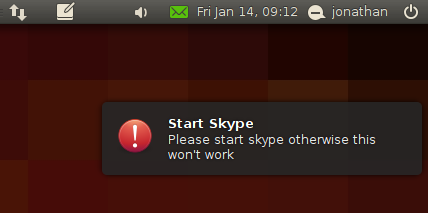
This next function is where the meat of the process takes place. Please read the inline comments to understand how it works, and ask for clarification by posting a comment.
	def create_indicators(self):

		"""Loads skype messages, displays them as notification bubbles and also shows them in the messaging menu"""

		#initialize count dictionaries
		self.count={}
		#get unread messages from skype, set self.unread variable
		self.get_messages()

		#self.unread is a dictionary having the username of the sender as key and a list of messages as value
		for name in self.unread:

			# Here we look at the first message from this user to set the messaging menu indicator
			# we only want one indicator per user
			msg=self.unread[name][0]

			#initialize message count for this user
			if name not in self.count:
				self.count[name]=0
			if name not in self.oldcount:
				self.oldcount[name]=0

			# if this user doesn't have his indicator yet
			if name not in self.indicator:
				# create indicator
				self.indicator[name] = indicate.Indicator()
				print "creating indicator"

				# Set indicator properties
				self.fullname=self.name_from_handle(name)
				self.indicator[name].set_property("subtype", "im")
				self.indicator[name].set_property("sender", self.fullname )
				self.indicator[name].set_property("handle", name)

				#this gets the most user-friendly name available for this user
				user=self.user_from_handle(name)

				# get an avatar for this user
				try:
					# This will only work on windows
					self.file=name + '.jpg'
					user.SaveAvatarToFile(file)
				except Skype4Py.errors.ISkypeError:
					# So on linux we use a generated monster ID. Fun but useless!
					h=hashlib.md5(name).hexdigest()
					#TODO find a way to get skype avatars on linux
					urllib.urlretrieve('http://friedcellcollective.net/monsterid/monster/%s/64' % h,name + '.jpg')
					self.file=name + '.jpg'

				#convert the imge to a pixbuf
				pixbuf=gtk.gdk.pixbuf_new_from_file(self.file)
				# for use in the indicator
				self.indicator[name].set_property_icon("icon", pixbuf)

				# set the timestamp of the indicator (this is what makes the indicator display the time since the message was received
				self.indicator[name].set_property_time("time", msg.Timestamp)

				self.indicator[name].show()
				# when the user clicks on the indicator message, open the skype messaging window for this user
				self.indicator[name].connect("user-display", self.display_msg)

			msgbody = ''
			#reverse list so latest message is at the bottom
			for eachmsg in self.unread[name][::-1]:
				# msgbody contains all the messages from that user so far
				msgbody += eachmsg.Body + "\n"

			# We set this person's indicator body to the compound text
			self.indicator[name].set_property("body", msgbody)

			# if there are more than one message from this user, we set the indicator count to be displayed in the messaging menu.
			# Otherwise the time elapsed since receiving the message will be shown
			if self.count[name] > 1:
				self.indicator[name].set_property("count", str(self.count[name]))

			# If a new message arrived since last time checked, mark notification as not shown
			if self.count[name] > self.oldcount[name]:
				self.notifShown[name]=False

			#If notification marked as not shown, show it
			if not self.notifShown.get(name, False) and self.showNotification(self.fullname, msgbody, self.file):
				#mark notification as shown
				self.notifShown[name]=True

				self.indicator[name].set_property("draw-attention", "true")
				self.indicator[name].show()
				print "notification shown for", name

			print "%d messages from %s" %(self.count[name],name)
		# Set oldcountt variable for next loop
		self.oldcount=self.count
		# Loop runs as long as true is returned
		return True
When a new messages arrives, this is what the messaging menu looks like
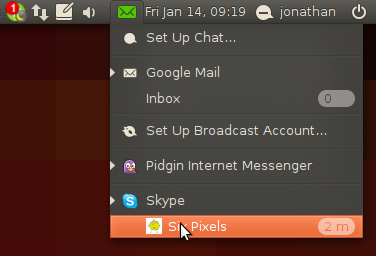
The function that gets unread skype messages is as follows For each message, we add it to a list containg the messages from a particular user in the self.unread dictionary.
	def get_messages(self):
		print "checking messages"
		self.unread={}

		for msg in self.skype.MissedMessages:
			display_name = msg.FromHandle
			if display_name not in self.count:
				self.count[display_name]=0
			if not display_name in self.unread:
				self.unread[display_name]=[]

			self.unread[display_name].append(msg)
			self.count[display_name]+=1
		return self.unread
The next two functions are in charge of getting the skype user username as well as the friendliest name available.
	def name_from_handle(self,handle):
		user=self.skype.User(handle)
		if user.FullName:
			return user.FullName
		elif user.DisplayName:
			return user.DisplayName
		else:
			return handle

	def user_from_handle(self,handle):
		return self.skype.User(handle)
Below is the generic function in charge of showing popup notifications.
	def showNotification(self, title, message,file=None):
		'''takes a title and a message to display the email notification. Returns the
        created notification object'''

		n = pynotify.Notification(title, message, "notification-message-im")
		if file is not None:
			n.set_property("icon-name",os.getcwd() + "/" + file)
		n.show()

		return n
This is what it looks like with three new messages
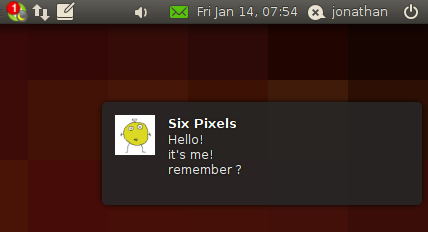
The next one shows the popup notification that skype is not loaded :
	def noSkype(self):
		'''Shows a notification if skype is not started'''
		title='Start Skype'
		message='Please start skype otherwise this won\'t work'
		n = self.showNotification(title, message)
		n.set_property("icon-name",gtk.STOCK_DIALOG_WARNING)
		n.show()

		return n
And finally, the indicator events callbacks (what happens when we click on the skype indicator, or on a particular message
	def display_msg(self, indicator, timestamp):
		#hide this indicator
		indicator.hide()
		#messaging menu goes back to normal
		indicator.set_property("draw-attention", "false")
		# open the skype chat window for this user
		self.skype.Client.OpenMessageDialog(indicator.get_property("handle"))
At the end of the file, we start everything :
if __name__ == "__main__":
	skypeind=skypeIndicator()
	# Loop
	gobject.timeout_add_seconds(5, skypeind.create_indicators)
	gtk.main()
And finally, here is the complete source code :
#!/usr/bin/env python
#
#Copyright 2010 Jonathan Foucher
#
#Authors:
#    Jonathan Foucher <[email protected]>
#
#This program is free software: you can redistribute it and/or modify it
#under the terms of either or both of the following licenses:
#
#1) the GNU Lesser General Public License version 3, as published by the
#Free Software Foundation; and/or
#2) the GNU Lesser General Public License version 2.1, as published by
#the Free Software Foundation.
#
#This program is distributed in the hope that it will be useful, but
#WITHOUT ANY WARRANTY; without even the implied warranties of
#MERCHANTABILITY, SATISFACTORY QUALITY or FITNESS FOR A PARTICULAR
#PURPOSE.  See the applicable version of the GNU Lesser General Public
#License for more details.
#
#You should have received a copy of both the GNU Lesser General Public
#License version 3 and version 2.1 along with this program.  If not, see
#<http://www.gnu.org/licenses/>
#


import indicate
import gobject
import pynotify
import gtk
import hashlib
import Skype4Py
import urllib
import os


class skypeIndicator:
	notifShown={}
	oldcount={}
	count={}
	indicator={}

	def __init__(self):
		#self.no_skype()
		#get skype control
		self.skype= Skype4Py.Skype()

		self.loadSkype()

		#create notification icon

		self.server = indicate.indicate_server_ref_default()
		self.server.set_type("message.im")
		self.server.set_desktop_file("/usr/share/applications/skype.desktop")
		self.server.connect("server-display", self.server_display)
		#self.server.set_status (indicate.STATUS_ACTIVE)
		self.server.show()
#		for slot in dir(self.server):
#			attr = getattr(self.server, slot)
#			print attr

		#self.unread={}
		#self.indicator.set_property('draw-attention', 'true');
		self.create_indicators()
		#pass
		#indicator.connect("user-display", self.display_msg)
	def loadSkype(self):
		try:
			if not self.skype.Client.IsRunning:
				self.skype.Client.Start()
		except:
			#
			print "Please open skype first"
			self.noSkype()


		try:
			self.skype.Attach()
		except Skype4Py.errors.ISkypeAPIError:
			print "Please open skype first"
			self.noSkype()
			#pass

	def create_indicators(self):

		"""Loads skype messages, displays them as notification bubbles and also shows them in the messaging menu"""

		#initialize count dictionaries
		self.count={}
		#get unread messages from skype, set self.unread variable
		self.get_messages()

		#self.unread is a dictionary having the username of the sender as key and a list of messages as value
		for name in self.unread:

			# Here we look at the first message from this user to set the messaging menu indicator
			# we only want one indicator per user
			msg=self.unread[name][0]

			#initialize message count for this user
			if name not in self.count:
				self.count[name]=0
			if name not in self.oldcount:
				self.oldcount[name]=0

			# if this user doesn't have his indicator yet
			if name not in self.indicator:
				# create indicator
				self.indicator[name] = indicate.Indicator()
				print "creating indicator"

				# Set indicator properties
				self.fullname=self.name_from_handle(name)
				self.indicator[name].set_property("subtype", "im")
				self.indicator[name].set_property("sender", self.fullname )
				self.indicator[name].set_property("handle", name)

				#this gets the most user-friendly name available for this user
				user=self.user_from_handle(name)

				# get an avatar for this user
				try:
					# This will only work on windows
					self.file=name + '.jpg'
					user.SaveAvatarToFile(file)
				except Skype4Py.errors.ISkypeError:
					# So on linux we use a generated monster ID. Fun but useless!
					h=hashlib.md5(name).hexdigest()
					#TODO find a way to get skype avatars on linux
					urllib.urlretrieve('http://friedcellcollective.net/monsterid/monster/%s/64' % h,name + '.jpg')
					self.file=name + '.jpg'

				#convert the imge to a pixbuf
				pixbuf=gtk.gdk.pixbuf_new_from_file(self.file)
				# for use in the indicator
				self.indicator[name].set_property_icon("icon", pixbuf)

				# set the timestamp of the indicator (this is what makes the indicator display the time since the message was received
				self.indicator[name].set_property_time("time", msg.Timestamp)

				self.indicator[name].show()
				# when the user clicks on the indicator message, open the skype messaging window for this user
				self.indicator[name].connect("user-display", self.display_msg)

			msgbody = ''
			#reverse list so latest message is at the bottom
			for eachmsg in self.unread[name][::-1]:
				# msgbody contains all the messages from that user so far
				msgbody += eachmsg.Body + "\n"

			# We set this person's indicator body to the compound text
			self.indicator[name].set_property("body", msgbody)

			# if there are more than one message from this user, we set the indicator count to be displayed in the messaging menu.
			# Otherwise the time elapsed since receiving the message will be shown
			if self.count[name] > 1:
				self.indicator[name].set_property("count", str(self.count[name]))

			# If a new message arrived since last time checked, mark notification as not shown
			if self.count[name] > self.oldcount[name]:
				self.notifShown[name]=False

			#If notification marked as not shown, show it
			if not self.notifShown.get(name, False) and self.showNotification(self.fullname, msgbody, self.file):
				#mark notification as shown
				self.notifShown[name]=True

				self.indicator[name].set_property("draw-attention", "true")
				self.indicator[name].show()
				print "notification shown for", name

			print "%d messages from %s" %(self.count[name],name)
		# Set oldcountt variable for next loop
		self.oldcount=self.count
		# Loop runs as long as true is returned
		return True


	def name_from_handle(self,handle):
		user=self.skype.User(handle)
		if user.FullName:
			return user.FullName
		elif user.DisplayName:
			return user.DisplayName
		else:
			return handle

	def user_from_handle(self,handle):
		return self.skype.User(handle)

	def showNotification(self, title, message,file=None):
		'''takes a title and a message to display the email notification. Returns the
        created notification object'''

		n = pynotify.Notification(title, message, "notification-message-im")
		if file is not None:
			n.set_property("icon-name",os.getcwd() + "/" + file)
		n.show()

		return n

	def noSkype(self):
		'''Shows a notification if skype is not started'''
		title='Start Skype'
		message='Please start skype otherwise this won\'t work'
		n = self.showNotification(title, message)
		n.set_property("icon-name",gtk.STOCK_DIALOG_WARNING)
		n.show()

		return n

	def get_messages(self):
		print "checking messages"
		self.unread={}

		for msg in self.skype.MissedMessages:
			display_name = msg.FromHandle
			if display_name not in self.count:
				self.count[display_name]=0
			if not display_name in self.unread:
				self.unread[display_name]=[]

			self.unread[display_name].append(msg)
			self.count[display_name]+=1
		return self.unread


	def server_display(self, widget, timestamp=None):
		#Show main Skype window
		self.skype.Client.Focus()

	def display_msg(self, indicator, timestamp):
		#hide this indicator
		indicator.hide()
		#messaging menu goes back to normal
		indicator.set_property("draw-attention", "false")
		# open the skype chat window for this user
		self.skype.Client.OpenMessageDialog(indicator.get_property("handle"))


if __name__ == "__main__":

	skypeind=skypeIndicator()

	# Loop
	gobject.timeout_add_seconds(5, skypeind.create_indicators)
	gtk.main()
Download the script, or fork it on the ubuntu-skype-indicator github repository
UPDATE: Before you run this script, you need to install its dependencies, python-indicate and skype4py On ubuntu, it’s as simple as running
sudo apt-get install python-skype python-indicate